For thirty years, the password has been the front door to our digital lives — and for most of that time, it's been a door with a flimsy lock. If you've ever reused a password, struggled to remember one, or received a "your data may have been exposed" email, you already know the problem first-hand.
There's now a better way, and it's quietly becoming the standard across the biggest names in tech: passkeys. Apple, Google, Microsoft and thousands of websites already support them. If you look after a business, this is a shift worth understanding — because it changes the single most common way accounts get broken into.
Here's what's actually going on, in plain English.
The trouble with passwords
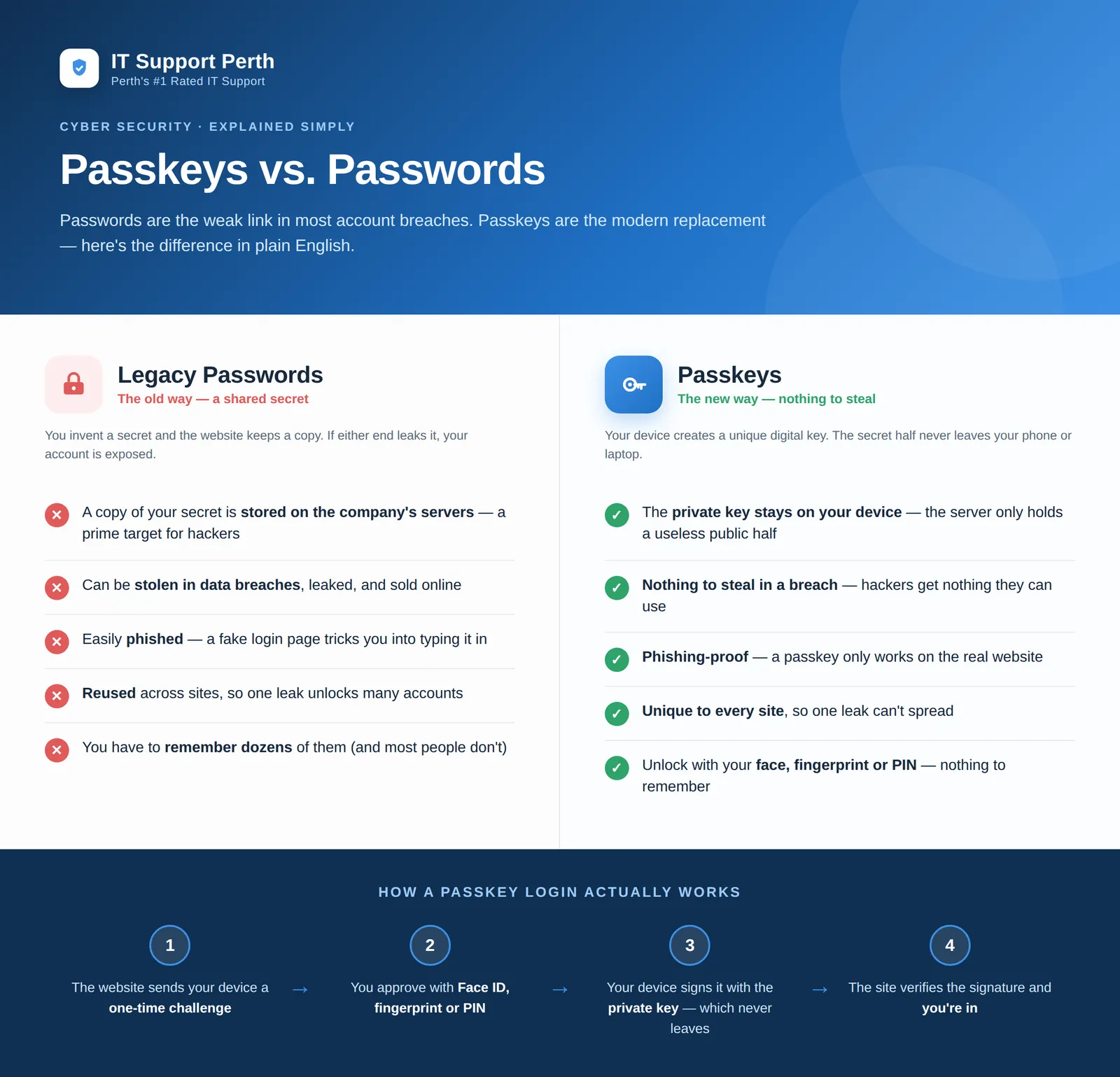
A password is a shared secret. You make one up, and the website keeps a copy so it can check you next time you log in. That simple arrangement is the root of nearly every problem:
The website has to store your secret, which makes its servers a giant target. When a company gets breached, attackers often walk away with millions of passwords in one go. Because most people reuse the same handful of passwords across different sites, a single leak can quietly unlock a dozen other accounts — your email, your banking, your business systems.
Worse, passwords can be phished. A convincing fake login page, an urgent-looking email, and even careful people hand their password straight to a criminal without realising it. No amount of "make it longer and add a symbol" advice fixes that, because the human is the weak point, not the password.
The result: stolen and reused passwords remain the leading cause of account breaches year after year.
How passkeys are different
A passkey throws out the shared secret entirely. Instead, when you set one up, your device (your phone, laptop or tablet) creates a unique pair of digital keys:
A private key that never leaves your device, and a public key that gets handed to the website. Think of the public key as a padlock the website keeps, and the private key as the only key that opens it — a key that stays locked inside your device and is protected by your fingerprint, face, or PIN.
Because the website only ever stores the "padlock" half, a data breach gives attackers nothing they can use. There's no secret sitting on the server to steal. And because a passkey is mathematically tied to the real website's address, it simply won't work on a fake phishing page — the login you're tricked into visiting isn't the one your passkey recognises. Phishing, in other words, stops working.
What a passkey login actually feels like
The clever cryptography happens invisibly. Here's the whole experience from your side:
You go to log in. The website sends a one-time challenge to your device. You approve it the same way you unlock your phone — Face ID, a fingerprint, or a PIN. Your device signs the challenge with the private key, the website checks the signature, and you're in. No password typed, nothing to remember, nothing that can be stolen or reused.
For most people it's not just safer — it's genuinely faster and less frustrating.
Passkeys and MFA — how they fit together
If you've already rolled out multi-factor authentication (MFA) — and every business should have — passkeys are the natural next step, not a replacement to bolt on awkwardly. A passkey is what security people call phishing-resistant: it rolls "something you have" (your device) and "something you are" (your fingerprint or face) into a single, un-phishable login. Where an SMS code or an approval prompt can still be tricked out of a distracted employee, a passkey can't be handed over, because there's nothing to hand over.
Are passkeys worth it for your business?
For most Perth businesses, the answer is increasingly yes — especially for the accounts that matter most, like email, Microsoft 365, Google Workspace, and any system holding customer or financial data. Passkeys remove the two attacks that cause the most damage: credential theft from breaches, and phishing.
That said, moving over is a transition, not a flick of a switch. You'll want to think about which systems support passkeys today, how staff enrol their devices, what happens when someone loses a phone, and how passkeys sit alongside your existing MFA. Done well, it's one of the highest-impact security upgrades a small or medium business can make. Done hastily, it can lock people out of the tools they need.
That's the part we help with.
Getting started with passkeys in Perth
At IT Support Perth, we help local businesses roll out passkeys the right way — mapping which of your systems support them, setting up a smooth enrolment process for your team, and making sure there's always a safe recovery path if a device is lost. We handle the technical detail as part of our managed cyber security, so your staff simply get a login that's easier and dramatically harder to break.
If you're not sure whether your business is ready for passkeys — or you just want to stop worrying about the next password breach — get in touch with our team or call (08) 9325 1196. We're a Perth-based team with 25+ years of experience, and we're happy to talk it through in plain English.